So for a first tutorial, I'm gonna include a image for anyone to use. With this I will also explain the basics on how to turn something into a brush in Photoshop by using the image I've got here.
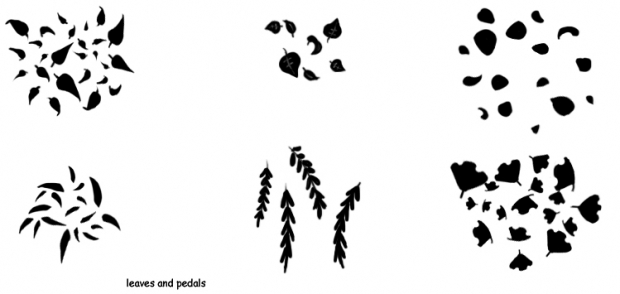
1. First open the image up in your photoshop. Select the image you would want to be a brush, by using the marquee tool. (that's the thingy that makes the dotted outlines Xp)
2. Go up to edit and find "define brush" or "define brush preset" depending on your version and name it. you may test the brush out now if you'd like, by going all the way to the bottom of the brushes list you have. It should be there.
3. Now that you have a brush, it won't stay there forever until you save it. To do that, there should be a drop down somewhere near your brush list (the place where you pick your brushes to draw with) then click "preset manager" from here, you delete all the brushes you don't want in your new set, and keep the ones you've made or you would like to be included with your new brushes. (I like to keep a few of the defaults with my new brushes for easy access) then just click "save set" name the set, and there you have it! a brush or set of brushes you've made!
Extras
If you don't have photoshop, but use something else, there's a few things you can do with them still. A lot of programs now adays, even free ones come with a brush making feature. If you still can't make brushes, you can manually copy one of the leaves images over to a new layer and just paste to that layer over and over, then change their colors using a hue/saturation tool or something to change their colors. It's a bit more involved though and would take more work.
If you don't like how the leaves look as they are, feel free to rearrange the leaves to your liking before turning them into brushes! These are also not ment to do the "spotted leaves" thing I see lots of people use the default leaves for. This is for making leaves on a tree easier kinda thing, and I wouldn't suggest using them for "filler" backgrounds because of how small they are. Making them bigger than they where intended can make them seem blurry and kinda gross, so be careful about that.
Why are they black and white? Pure black and white images are easier to manage than ones with gray tones. Gray in Photoshop is interpreted as "transparent" in Brushes and generally looks weird (to me at least) when it comes to leaves, grass, or any kind of plant unless it's something like very thin tips of grass blades or something like that.
What do you mean "filler backgrounds"? I mean the backgrounds with the Gradient fill and a few maple leaves brushed around the character. It's most used when people say "I suck at making a background" Which is okay when you're starting out, but it's a bit plain and boring but quick and easy. I personally don't like it, and wouldn't suggest it. I HIGHLY suggest NOT using these images for that because they are just too small to be really versatile.
