Hello all! Thanks for coming!
As my first post I would like to thank everyone’s great comments! It’s very uplifting and wonderful, there nothing like feeling good!
Everyone seen the Tokyo mew mew logo, the words are all curly, girly, and cute! But for the longest time I had no clue to how to obtain the font or where to get it. Heck, I just learned about installing fonts about a year ago and it really opened my design options!
The great thing about fonts is there are nearly unlimited kinds out there for any occasion! To pretty angelic frail ones to bold and grungy ones! Whatever feeling you’re trying to convey in your picture there will be font for it! And if you’re worried that they cost some cash you can put that to bed because there are tons of sites that you can direct download them for free! Isn’t life wonderful!
Tokyo Mew Mew font (known as “Action is”)
http://www.1001freefonts.com/afonts2.php
Other free font sites
http://www.searchfreefonts.com/
http://www.fontstock.net/topdownload.html
If you’re new to this like I was don’t worry its easy to install and use!
1. First, before you download any fonts make a new folder and name it anything you want. This will make it easier for you to locate your new fonts.
2. Once you do that, download the fonts that you want. Some fonts will be in zip files and you have to extract the font itself out because you won’t be able to access zip files though the installer window.
3. To do this “right click” the zip file and click “extract here”.
4. Once you see the fonts that you want to install in your font file your good to go!
5. Now go to start menu and into the control panel.
6. Click to the fonts icon
7. Once your in there “right click” on an empty space (make sure your not highlight anything!)
8. The drop down should show up and the final option should be “install new font”
a. Click that and it should take you to a window like this
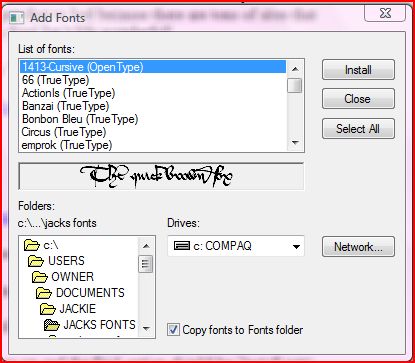
9. Go to your font file you made earlier in the lower left window with all the folders in them.
10. Once your there the window in the upper left next to the buttons should show all of your new fonts. If you got more then one font you want to install hold the “CTRL button” and highlight the ones you want, and then click on the install button. If you want to install them all click the “install all” button and all of them will be highlighted.
11. Click the install button and you will have new fonts at your disposal!
Thanks for visiting and happy font hunting!
